Pages

Monday, May 29, 2017

CT - Seaside Snags & Tags

Hi everyone!  I'm back, and I plan on being much more active here in my little corner of the universe.  I'm starting today by sharing some CT snags I made using the beautiful Seaside kit by Creative Scraps by Crys.  This kit has 87 elements and 20 papers.  You can purchase this kit at Mystical Scraps here or Scraps & Co. here.  Below is a preview of this awesome kit.


For my first set of snags, I decided to go cutsie with Cuddly Rigor Mortis.  You can purchase these tubes at CDO.  Please do not use these tubes without a license.


For my second tag, I was going to go cutsie again, but I wanted to showcase the classic-ness of this kit as well.  In this tag, I used a tube by Robert Alvarado.  I purchased this tube with a license at MPT.  However, you can currently purchase his tubes at CDO.   Please do not use Robert's tubes without a license.


Wednesday, September 7, 2016

Wallpaper and Snags

Hi everyone!  It's me the bad blogger here.  Sorry it's been so long since I've shared with you all in here.  I wish I could say I had a good excuse, but I've got none.

Anyhow, one of the groups I belong to is Creative Misfits, and they have a weekly challenge where they give you a word or a theme.  This week's word is music, and music always speaks to my soul.  So, in addition to completing the challenge there.  I have a couple little goodies for you.

The tube I used is by Lorri Kajenna, and you can purchase her art at Pics for Design here.
The scrap kit I used is LadyHawkDesign's portion of CDO's Music Collab.  (I also snuck in an element from Babycake's portion of the collab too.)  Sadly, this collab is not available for sale at this time.  You can find more beautiful kits by LHD at CDO here.

The wallpaper is sized 1920 x 1080.


And the snags.


Monday, November 23, 2015

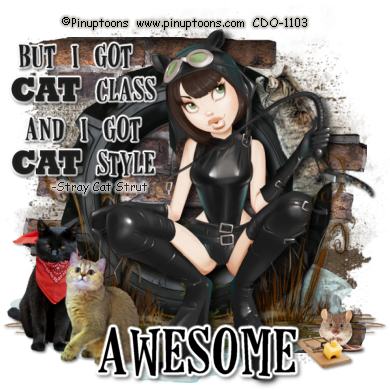
Alley Cat Snags and Wallpaper and Word Art

Hi everyone!  It's your MIA blogger here.  I have the best of intentions to do things and then life gets in my way.  However, I will hopefully have a bunch of new goodies coming your way in the next week or so, including new clothes for my blog.  Apparently it's naked right now.  LOL

For now, I have a wallpaper and some snags that I made from a challenge in one of my groups.  The challenge was to use an 80's song, and I was inspired by Stray Cat Strut by Brian Stetzer.

The tube I used is by Pinuptoons and can be purchased at CDO.
The kit I used is Alley Cat by Tif Scrap and can be purchased at Digital Crea.
 My word art can be used in any of your personal creations or tutorials.  I only ask that if you use it in a tutorial, you link back to my blog for download.  Thanks!


To download the wallpaper, click on it to bring it to full size and right click to save.


You can download my word art at 4shared. The fonts used in the word art are Rockwell Extra Bold and Horseshoes.


Sunday, July 12, 2015

Vinson Kimono Wallpaper and Snags

I'm back again with a new wallpaper and some snags for you featuring the artwork of Caron Vinson, and the matching bundle kit by LadyHawkDesigns.  You can purchase the bundle at CDO.  Please do not use Caron's artwork without a license.  The word art I used on the wallpaper is by Elegant Word Art by Bethany.

Hugs!


Monday, June 22, 2015

Gridded Mask

Look who's back.  The ghost town blogger....cuz my blog is looking like a ghost town!

I have a new tut for you today.  It's a super simple old school/no scraps tut.


Supplies
Paint Shop Pro (I used version 9, but this should work in all versions.)
Tube of Choice - I'm using one by Jeff Haynie.  You can purchase his tubes at CDO.
Toadies Ommadawn
WSL Mask 330 here
Eye Candy 4000 Gradient Glow (optional)
Font of choice.  (I'm using one called VTKS Dear Love.)

1.  Open a new image 400 x 400.
2.  Choose 2 colors from your tube (one for foreground and one for background)
3.  Click on your foreground and create a starburst gradient with the following settings.
4.  Flood fill your canvas with this gradient.
5.  Apply WSL mask 330 to this layer.
6.  Merge group.
7.  Add your tube as a new layer.  Resize as necessary.
8.  Duplicate your tube twice and hide the top two tube layers.
9.  On your bottom (original) tube layer, apply a gaussian blur of 5.
10.  Move slightly up and to the left.
11.  Apply Toadies Ommadawn with the following settings.

  12.  Using your magic wand with the following settings, click on the black lines.  You may want to zoom in.
13.  Selections>Modify> Expand by 2.
14.  Hit delete on your keyboard.
15.  Selections>Modify>Contract by 1.
16.  Add a new raster layer. 
17.  Flood fill with your gradient or a complementary color.
18.  Apply a drop shadow of choice.  I used V&H 2, O 50 and B 5.
19.  Unhide your middle tube layer and apply the same drop shadow.
20.  Unhide your top tube layer and apply a Gaussian Blur of 5.
21.  Change your blend mode to Overlay or something suitable to your tube.  (Different tubes look good with different blend modes.)
22.  Add your copyright and name.  I added a fat gradient glow to my name.
23.  Save as a PNG or JPEG.


Featuring the artwork of Carolina Seabra aka Queen Uriel.

This is the original tag I made for a challenge in the CDO Facebook group.


Saturday, December 6, 2014

Coffee Word Art and Extras

Hi everyone.  I did Fi's tut "No Presents" which has you make a word art.  I really liked the way my word art came out, so I decided to share it with you.

The word art is in PNG format, and you can right click to save it.  Feel free to use it in any of your creations.  You can use it in any tutorials that you write.  Just please keep my file name intact and refer people to my blog to save the word art for themselves.


The snags I made are featuring the artwork of Di Halim which can be purchased at Pics for Design.  Please do not use this tube unless you have purchased it.